
Engine Overview
Quick Navigation
- Main Components — ui, world, network, renderer, input
- Utility Components — assetManager, debug, metrics, platform, util
- Schemas · Data Interfaces
- UI Styles — shared CSS primitives (buttons, tooltips, animations, colors)
game
The game client exposes a global game variable that can be accessed through the console or via Tampermonkey / Greasemonkey user scripts. From now on, for convenience, Tampermonkey / Greasemonkey user scripts will simply be referred to as scripts.
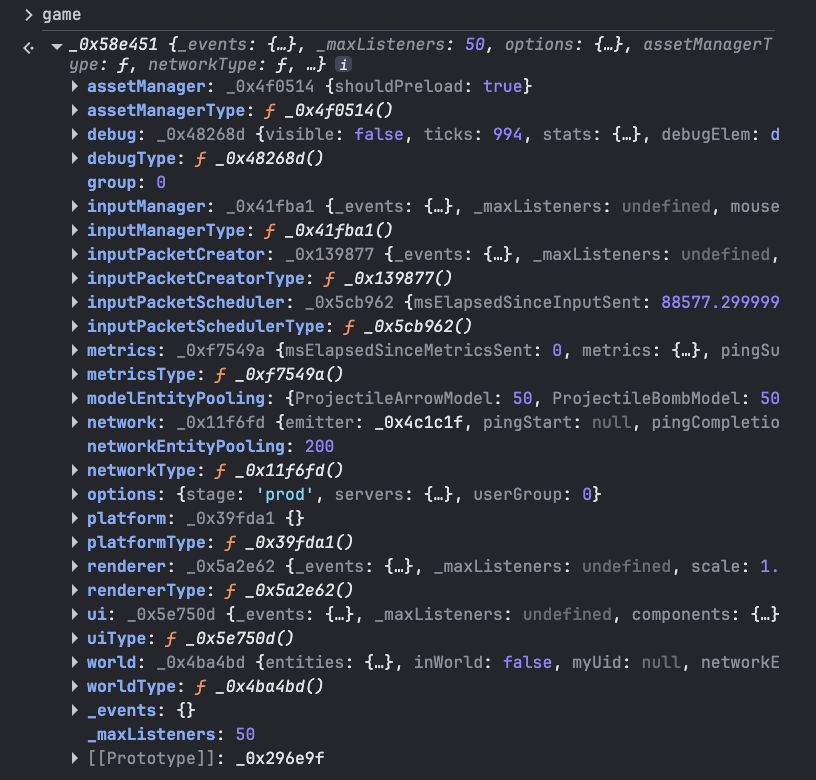
There are 3 types of things inside the game object:
- Game components: All of the components that make the client work.
- Game component classes: Keys that ends with
Typeare of this type, which can be used to create more instances of any game component. - Miscellaneous: Includes server data, event listeners, ...
Main Components
ui
Class: Ui public
The ui component is the central manager for the game's HUD. It orchestrates multiple components, handles user input (keyboard/mouse) and synchronizes game state (inventory, buildings, parties).
See also: UI Styles for the shared CSS design system (buttons, tooltips, layout grid, state classes, and asset selectors).
world
Class: World public
The world component is responsible for managing the game world state, including all networked entities, the local player, and the replication system. It handles entity creation, updates, and removal through object pooling, and synchronizes world state with the renderer each tick.
network
Class: Game/Network private
The network component handles all communication between the client and the server. It includes low-level socket management, binary encoding/decoding via ByteBuffer and a novel anti-bot mechanism.
See also: _MakeBlendField for the anti-bot mechanism.
renderer
Class: Game/Renderer private
The renderer component is responsible for all rendering using PIXI.js. It manages the render loop, the scene graph layer hierarchy, camera tracking, coordinate transformations, and viewport scaling.
Input
inputManager
Class: InputManager public
The InputManager class is responsible for handling raw DOM input events (keyboard and mouse) and emitting them as internal engine events used by other components, such as InputPacketCreator. It tracks the state of keys and mouse buttons and is integrated with the game's network lifecycle.
inputPacketCreator
Class: InputPacketCreator public
The InputPacketCreator class handles the conversion of user input events (keyboard and mouse) into network packets that are sent to the server. It listens to events from the InputManager and communicates with the Network module.
inputPacketScheduler
Class: InputPacketScheduler public
The InputPacketScheduler class manages the timing and delivery of input packets to the server by acting as a buffer between InputPacketCreator and NetworkAdapter. It ensures that input data is not sent faster than the server's tick rate (50ms+), providing a more consistent and synchronized input stream.
Utility Components
assetManager
Class: AssetManager public
The assetManager class is simple: it is an abstraction over pixi.js's asset loader and provides preloaded models.
debug
Class: Debug public
The debug utility provides a fixed on-screen display for monitoring real-time game performance (FPS/millisecond), engine metrics and network synchronization. This HUD is hidden from the user, and can be toggled on/off with the F6 key.
metrics
Class: Metrics public
The Metrics class is responsible for collecting and reporting performance data to the server. It tracks various indicators such as FPS, ping, and client-side lag.
platform
Class: Platform public
This class exists, but doesn't have any useful utilities.
util
Class: util private (not accessible)
The Util class is a private utility class that is used internally to provide a collection of static helper methods.
Schemas
See Schemas for every schema documentation.
Data Interfaces
See Data Interfaces for special data interfaces used in the engine.